
Compare Up to 5 Securities Side by Side
Morningstar is known for helping investors turn questions into confident decisions. This week, we introduced a new way to do exactly that: the Compare tool, now live and available on Morningstar.com.
Compare lets you evaluate up to five securities side by side using a standardized set of data points and, exclusive for Morningstar Investor subscribers, Morningstar ratings. It's built to help you see how different investing opportunities stack up. Whether you're weighing a few funds with similar strategies or running a quick final check before a buy or sell decision, Compare puts the relevant numbers in one clear view.
Here's what the Compare tool does, what launched alongside it, and how it fits the way you actually invest.
What You Can Do with Compare
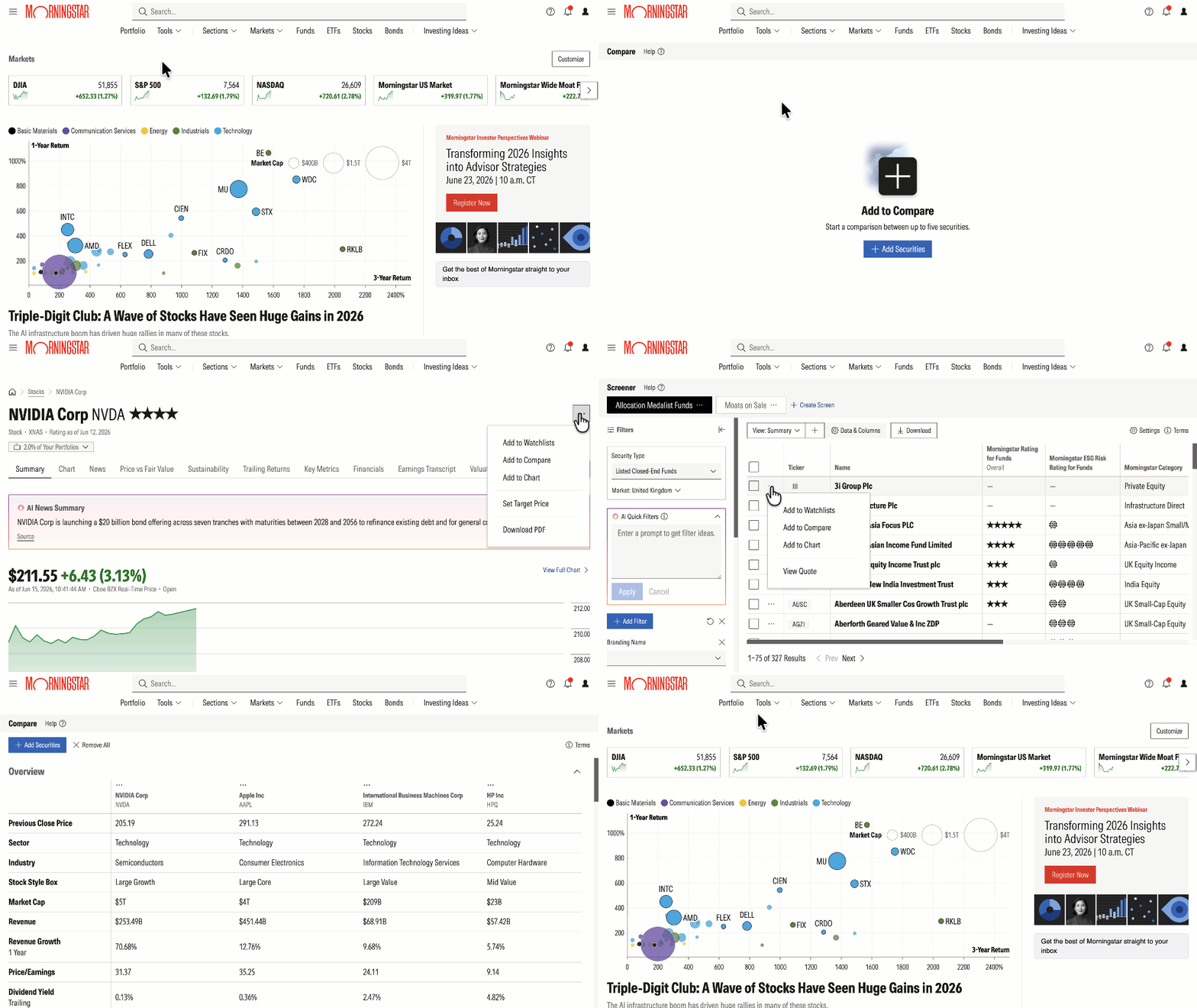
Compare is designed to make side-by-side evaluation straightforward. With the tool, you can:
- Compare up to five securities at once. Add securities to a single view and scan across data categories such as Dividend Information and Morningstar Ratings and Research.
- Mix fund types. Compare investments with the same security type—stocks against stocks, or funds against funds—and evaluate mutual funds against ETFs when that comparison makes sense.
- Expand or collapse sections. Focus on the categories that matter to you and hide the rest.
Getting started takes one click. Open Compare from the Tools drop-down menu in the top navigation. Or you can add launch Compare from the Actions menu (the three dots/ellipsis icon) wherever you see it across Morningstar Investor tools, or from the More Actions menu on a quote page. Within the Compare tool itself, select Add Securities and search for any security you want to include.
71 New Data Points, Available Across Morningstar Investor Tools
Alongside Compare, we've added 71 new data points. These are now accessible in Compare and across the Portfolio, Screener, and Watchlist tools via Data and Columns, so you can apply the same depth of detail wherever you research and monitor investments.
A few standouts:
FUNDS
- Asset Allocation: US Equity, Non-US Equity, Fixed Income, Other, Cash, Non-Classified
- Equity Sectors: Basic Materials, Consumer Cyclical, Financial Services, Real Estate, Communication Services, Energy, Industrials, Technology, Consumer Defensive, Healthcare, Utilities
STOCKS
- Dividend Per Share (Most Recent Payment)
- Dividend Per Share (3-yr and 5-yr)
- Operating Cash Flow Growth
- Total Debt
- EBIT Margin
Together, these data points give you a fuller picture of a security's strength relative to your investing goals.
Frequently Asked Questions
What is the Morningstar Compare tool? Compare is a Morningstar Investor feature that lets you evaluate up to five securities side by side, using a standardized set of data points and Morningstar ratings. It's designed for quick, early-stage evaluation or as a final check before a buy or sell decision.
Which securities can I compare? You can compare up to five stocks, mutual funds, or ETFs, including international securities. You can compare within an asset class or weigh mutual funds against ETFs. Bonds and indexes are not currently supported.
How do I access Compare? Open it from the Tools drop-down menu in the top navigation, or add a security from the Actions menu found across the site and the More Actions menu on quote pages.
Can I save a comparison for later? Not yet. If you leave the tool, the comparison resets, so plan to take action—such as adding a security to a Watchlist—while you have the tool open in your browser.
How is Compare different from Screener? Screener is built for exploring and filtering thousands of securities to surface new ideas. Compare is built for evaluating a shortlist of securities you've already identified.
Where can I learn more? Visit the Help Center for two new articles under the Compare topic: a how-to overview and a data point guide matched to your stage of investing.

 United States