
Orangedox Introduces Document Signing for Google Drive and Dropbox

VANCOUVER, BC / ACCESS Newswire / October 19, 2026 / Orangedox helps businesses share sensitive documents, manage virtual data rooms and understand how recipients engage with their files. Used by more than 300,000 professionals, the platform connects to Google Drive and Dropbox to support fundraising, due diligence, mergers and acquisitions, and business collaboration. Orangedox is CASA Tier 2 certified and provides information on its GDPR, CCPA and HIPAA compliance on its security page.
The feature brings signing into the platform teams already use to share and track business documents. Users select an existing file, choose the information each signer needs to provide and enter their email addresses. Orangedox sends the requests and automatically adds a signature page to the completed document.
For teams managing fundraising, acquisitions or client agreements, the aim is simple: fewer steps between preparing a document and getting it signed.
From cloud storage to signature
A term sheet, advisor agreement or client contract may already be sitting in a shared folder, ready to go. Preparing it for signing can mean downloading it, exporting a PDF, uploading another copy and positioning signature fields for each recipient.
Orangedox removes those preparation steps. Document Signing supports Google Docs, Sheets and Slides, along with PDF, Microsoft Word and PowerPoint files. Users do not need to manually convert supported files or build a template with fillable fields before sending them.
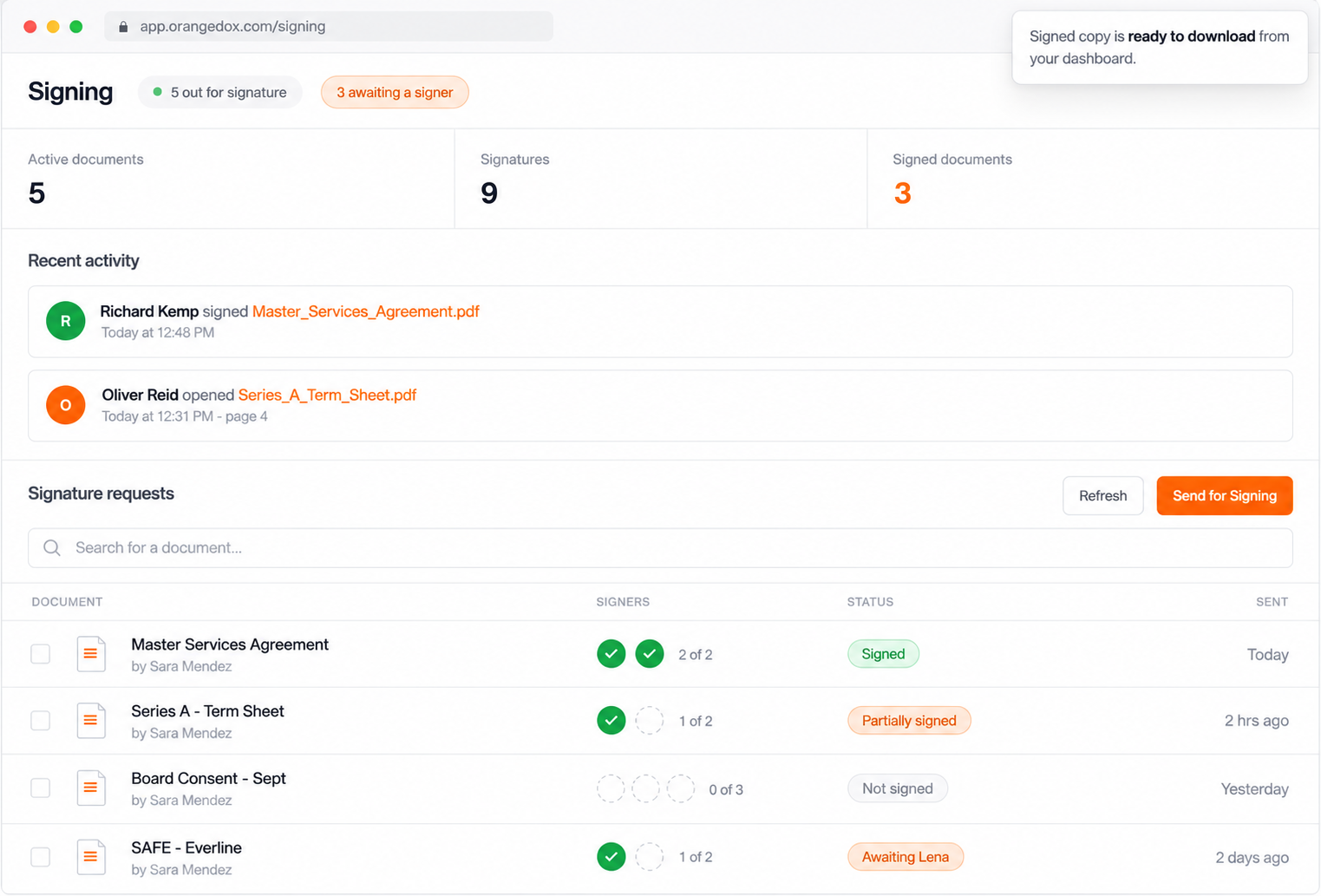
The workflow takes four steps:
- Select a file from the connected Google Drive or Dropbox account.
- Choose the information to collect, with name, date and signature included by default.
- Add the email addresses of everyone who needs to sign.
- Send the request. Each recipient receives an individual signing link by email.
Users can also request each signer's company and title.
See who opened it, who signed and who is still outstanding
Document Signing includes a dedicated dashboard for monitoring requests and recipient activity.
Teams can check each person's signing status, review when a signature was completed and receive notifications when documents are opened or signed. Page-level tracking also shows which pages recipients viewed and how long they spent on each page.
This gives teams more context when following up on an agreement. They can distinguish between a recipient who has opened the document and one who has already completed their signature.
A completed copy with signing details
Senders who also need to sign can add themselves as a signer when setting up the request. Once all required recipients have signed, every signer receives a copy of the completed document, which is also available for the sender to download. Its appended signature page records the signatures and associated details, including signing timestamps, IP addresses and any optional information collected, such as company and title.
Teams can then add the completed copy to an Orangedox data room alongside the other documents supporting their deal.
More information is available on the Orangedox Document Signing page.
About Orangedox
Orangedox helps businesses share sensitive documents, manage virtual data rooms and understand how recipients engage with their files. Connected to Google Drive and Dropbox, the platform supports document workflows for fundraising, due diligence, mergers and acquisitions, and business collaboration.
Learn more at orangedox.com.
Media contact
Nikola Stavrovski
Orangedox
pr@orangedox.com
SOURCE: Orangedox
View the original press release on ACCESS Newswire
The articles, information, and content displayed on this webpage may include materials prepared and provided by third parties. Such third-party content is offered for informational purposes only and is not endorsed, reviewed, or verified by Morningstar.
Morningstar makes no representations or warranties regarding the accuracy, completeness, timeliness, or reliability of any third-party content displayed on this site. The views and opinions expressed in third-party content are those of the respective authors and do not necessarily reflect the views of Morningstar, its affiliates, or employees.
Morningstar is not responsible for any errors, omissions, or delays in this content, nor for any actions taken in reliance thereon. Users are advised to exercise their own judgment and seek independent financial advice before making any decisions based on such content. The third-party providers of this content are not affiliated with Morningstar, and their inclusion on this site does not imply any form of partnership, agency, or endorsement.
Popular

4 Stocks to Buy for the Long-Term While They’re Still Undervalued

Are TIPS ETFs the Best Way to Fight Inflation?
6 ETFs To Diversify Away From AI

What’s Ahead for Stocks This Quarter—and Where to Invest


 United States